Media Library
Local file scanning with sidecar metadata, watch progress on every card, music shelves, and automatic deduplication so your library stays clean.
Folder scanning and discovery
Point RuForge at your download folder and any custom roots. The library scans for video and audio files, reads yt-dlp sidecars for metadata (title, uploader, source_id), and builds gallery cards with thumbnails.
- Supports mp4, mkv, webm, m4a, and common video/audio extensions
- Reads .info.json sidecars for title, uploader, duration, source URL
- Multiple library roots: default download path plus custom folders
- Refresh scan on demand or after new downloads land
Watch progress and thumbnails
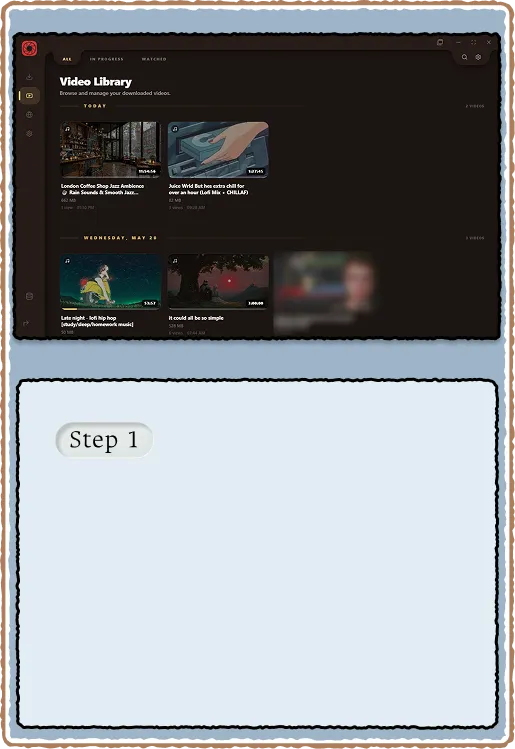
Each card shows a thin progress bar at the bottom representing how far you watched. Hover reveals the cover thumbnail (audio files keep cover art, video files show a frame). The bar data persists in localStorage so progress survives restarts.
- Furthest-reached position stored per file (not just last position)
- Thumbnail bars use playback storage for mini progress indicators
- Audio cards display a Music pill in the top-left corner
- Hover does not blank audio files, cover art stays visible
Deduplication and cleanup
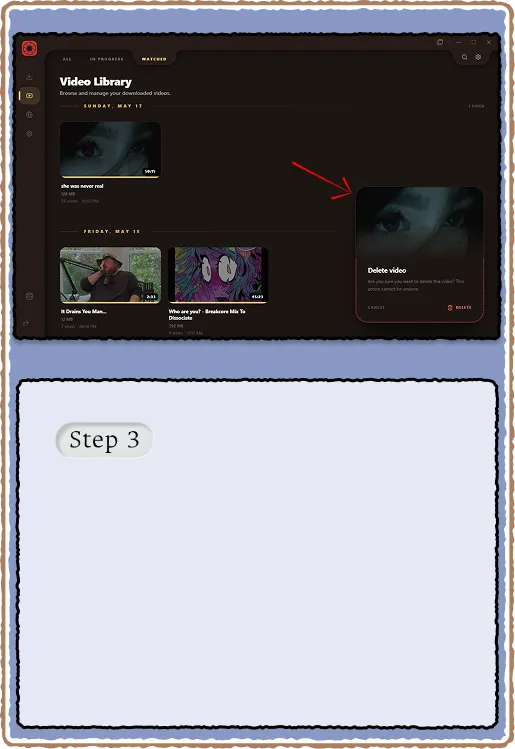
Gallery scan groups files by source_id from their sidecar. If yt-dlp left behind a video-only fragment next to the muxed output, it gets hidden. Delete removes the file, cancels any in-flight ffmpeg preview work, and waits for the per-file lock before cleanup.
- Dedupe by source_id across directories (cross-dir merge in fetchEntries)
- Delete cancels ffmpeg sprite generation if still running
- Replace re-downloads over the matched file (audio vs video ext aware)
- Ghost queue rows disappear when you delete from the library